Let AI supervise itself
Wire AI into a development workflow that catches mistakes automatically.
I used to review every line of AI-generated code. Now I review maybe 10%.
Part of it is the latest models. Claude Opus 4.5 is exceptional. But the bigger shift was wiring AI into a workflow where mistakes get caught automatically.
Most teams treat AI like a junior developer who needs constant supervision. They prompt, review, fix, repeat. Every change requires human attention. This works, but you're leaving a lot on the table.
AI can supervise itself if you wire it into your development toolchain.
The loop
Here's the workflow I run now:
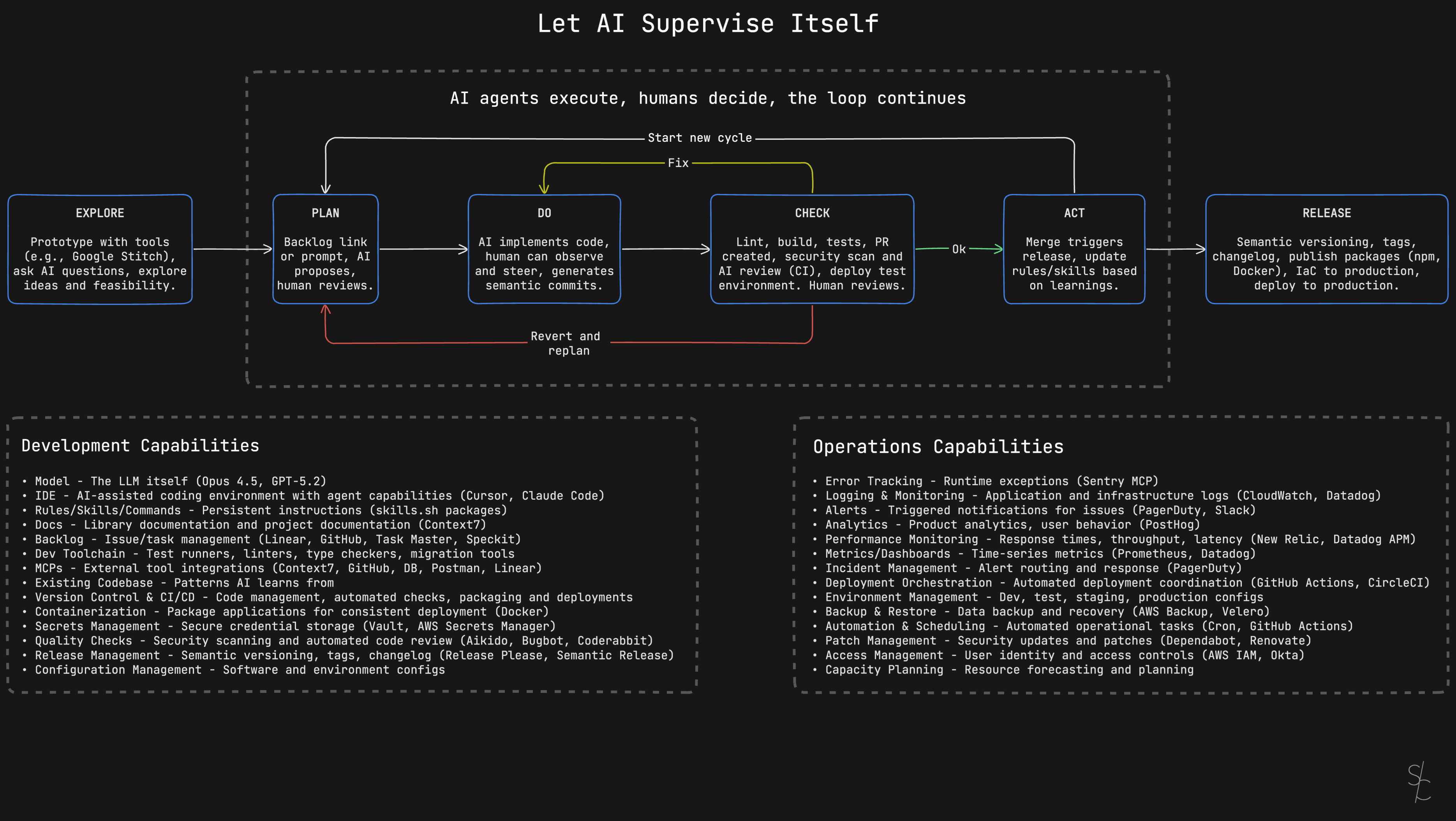

Explore
Before committing to implementation, prototype with AI tools. Test ideas quickly. Ask questions. Explore feasibility.
This step catches bad ideas early. If a feature doesn't work in prototype, you haven't wasted implementation time.
Two tools I reach for:
Google Stitch turns text prompts or sketches into UI designs and frontend code. Describe what you want, upload a wireframe, and it generates HTML/CSS with multiple variants to compare. Export to Figma for refinement or grab the code directly. Free through Google Labs, powered by Gemini.
V0 by Vercel generates production-ready React components with Tailwind CSS and Shadcn UI. Upload a design screenshot or describe what you need. Clean, accessible code you can deploy immediately or copy into your project. Iterative refinement without starting over.
Both let you answer "will this work?" in minutes instead of hours.
Plan
Give AI a backlog link or describe what you want. MCPs for Linear and GitHub fetch issue descriptions directly, so the AI reads the full context without copy-pasting.
The AI proposes an approach. You review and adjust. This is where human judgment matters most. The AI suggests paths, you pick the right one.
Don't skip this step. A good plan prevents hours of wasted implementation.
Do
This is where planning feeds into execution. In Cursor, you switch from Plan mode to Agent mode. The plan becomes the agent's task list.
Agent mode is autonomous. The AI edits multiple files, runs terminal commands, fixes errors it encounters, and iterates until the task is done. You watch it work in real time. A sidebar shows progress, which files are being modified, and command output.
The key insight: you're course-correcting, not micromanaging. Most of the time you let the agent run. When it starts heading in the wrong direction, you step in and redirect. Cursor lets you pause, revert changes, adjust prompts, refine the plan, or take over specific files.
Claude Code works similarly for terminal-based workflows. Both tools support MCP integrations, so the agent can fetch documentation, check APIs, or query your backlog without leaving the implementation flow.
Commit messages get generated automatically. The AI analyzes staged changes and writes conventional commits (feat, fix, refactor with scope and description). The format follows the Conventional Commits spec, which means Release Please can parse them later for semantic versioning and changelogs. You review and adjust before committing, but the heavy lifting is done.
Check
This is where automatic supervision kicks in.
The AI runs CLI commands directly. Lint errors, type errors, build failures, failing tests. It reads the output, understands what went wrong, and fixes it. No copy-pasting error messages. The agent sees the same terminal output you would and acts on it.
Both Cursor and Claude Code support this. In Cursor, the agent runs commands in a sandboxed terminal by default. It can read and write within your workspace but can't touch the network or files outside the project. You configure which commands run automatically and which require your approval. Want the agent to run npm test freely but ask before git push? You set that in permissions.
Claude Code uses allowed-tools in command definitions. You can restrict Bash access to specific patterns like git commands only, or npm commands only. The agent can't run arbitrary shell commands unless you explicitly allow them.
The automation chain:
- Linting and type checking catch syntax and type errors immediately
- Build verifies the code compiles
- Tests verify behavior (e.g. Playwright for E2E)
- PR creation packages the changes for review
- Security scan (Aikido) catches vulnerabilities
- AI code review (Coderabbit, Cursor Bugbot) spots issues before you look
- Test environment deploy lets you verify in a real environment
The feedback loops matter:
- If issues are found, AI fixes them automatically and returns to DO
- Bigger problems? Revert and back to PLAN
- Pass? Proceed to ACT
Most issues get caught and fixed without human intervention. The automated checks handle the heavy lifting.
Human reviews the PR at the end of this phase. By the time changes reach you, they've already passed every automated check. You're looking for architecture decisions, business logic, and edge cases the automation can't catch.
Act
The agent updates the original issue in Linear or GitHub with a summary of what was implemented and how. The ticket that started in Plan gets closed with context, not just a commit reference. Merge triggers release.
Capture learnings. If the AI made a mistake that got through, add a rule so it doesn't happen again. If you found yourself explaining the same thing twice, write it down. If a pattern worked well, document it.
Your rules and skills compound over time. Each cycle makes the next one smoother. The AI gets better at your codebase, your patterns, your preferences. Six months from now, your workflow looks nothing like today.
Start new cycle. If there's more in the backlog, jump back to Plan. If the backlog is empty, go all the way to Explore.
Release
The release flow kicks off:
- Semantic versioning, tags, changelog
- Publish packages (npm, Docker)
- Apply infrastructure as code
- Deploy to production
Release Please handles the versioning automation. It parses your git history for Conventional Commit messages and creates a release PR. The PR stays open and updates itself as you merge more changes. When you're ready to release, merge the PR.
The tool determines version bumps from commit types. A fix triggers a patch version. A feat triggers a minor. A breaking change triggers a major. Changelogs generate automatically from commit messages. Tags get created. If you're publishing packages, the GitHub Action can trigger npm publish or Docker builds.
This is why conventional commits matter during the Do phase. The AI writes them, Release Please reads them, and the entire release pipeline runs without manual versioning decisions.
The shift
The more of your dev toolchain AI can access, the more autonomous it becomes. You shift from supervising every line to steering the process.
Most of these capabilities aren't new. Good software engineering practices haven't changed. CI/CD, automated testing, code review, semantic versioning, infrastructure as code. Teams have used these for years.
The agent just executes them now. Not all of them yet. Give it six months.
More from the blog
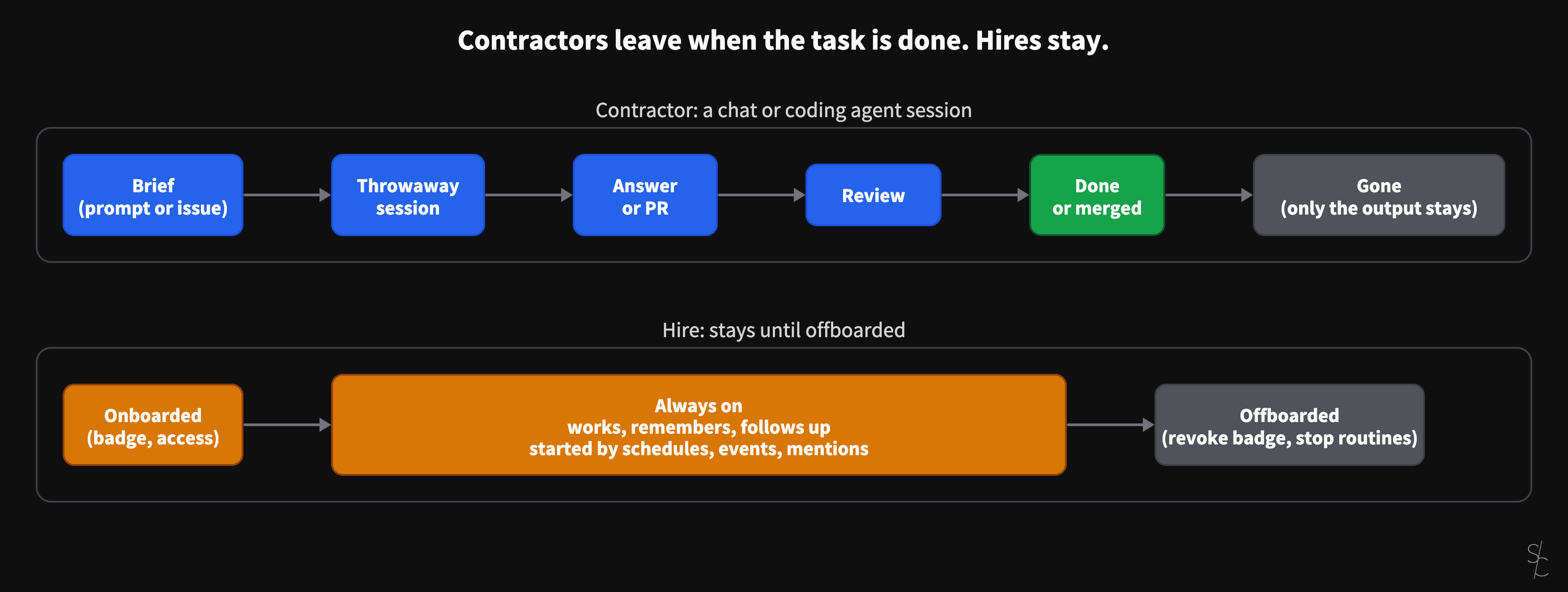
AI sessions are contractors. Always-on agents are hires.
A chat or a coding agent session ends when the task is done, when the answer is given or the PR is merged. Grok Bot and OpenAI's dots stay. That changes what you have to give them.
Eight months of an MCP server for Db2 for i
In January the server looked up table definitions so the AI would stop guessing. At 2.12 it checks its SQL against the IBM i, reads your business definitions, and lets colleagues sign in as themselves.
AI-assisted ERP document generation
ERP documents look simple. Underneath, they're conditional logic puzzles that have resisted modernization for decades.