
AI-assisted ERP document generation
ERP documents look simple. Underneath, they're conditional logic puzzles that have resisted modernization for decades.
A warehouse worker prints a reception confirmation. One line item splits across two pages: half the description on one sheet, the quantity columns on the next. The document looks broken. In the traditional ERP workflow, fixing this means opening a proprietary form designer, hunting for the right table property, adjusting page break settings, saving, uploading, generating a test PDF, reviewing. A consultant, half a day, a four-figure invoice.
I told the AI agent "this line item splits across pages, fix it." Ten seconds later the PDF was correct.
That gap is not about the agent being clever. It's about the template being code.
The document generation tax
Supply chain documents are deceptive. A reception confirmation or picking list looks straightforward. Underneath, dozens of conditional rules. Which address block to show depends on the order type. Item details expand or collapse based on supplier codes, manufacturing order references, shipment markings. Quantities that don't match need visual highlighting. Warehouse locations might come from the order line or fall back to the item's default bin. QR codes, lot tracking info, catch-weight indicators appear conditionally depending on the item and warehouse. Date fields stored as internal ERP counters need calendar table lookups. A single line item (actually three to six rows of data) must never split across a page break.
Enterprise tooling for this problem follows a familiar pattern. Adobe Forms, for instance, requires XDP templates built in Adobe Designer, a specialized skill set tied to a specific ecosystem. Other platforms have their own proprietary form designers, legacy print programs, or report builders that lack the layout control this work demands. The shared problems: slow iteration cycles, vendor lock-in, specialized skills, and poor version control. When a warehouse manager asks "can we add the supplier's item code to the confirmation?", the answer is measured in weeks and thousands.
HTML-to-PDF converters and generic report builders don't solve it either. They break down precisely where ERP documents need the most control: page breaks, repeating headers, keep-together rules, conditional row visibility.
DOCX as a layout engine
The approach I landed on treats DOCX not as a document format but as a layout engine with decades of refinement. Word's paragraph and table properties give precise control over page breaks (keepNext chains rows together, cantSplit prevents splitting), fixed column widths down to twentieths of a point, and repeating header rows. Native features, not hacks.
Three layers:
- A Node.js build script generates the DOCX template programmatically using the docx-js library
- Carbone merges JSON data into the template and converts to PDF
- A REST API fetches data from the ERP database, enriches it, and sends the payload to Carbone
All conditional logic lives in data preparation, not in the template. The API decides what to show. The template decides how to show it. If a field is empty, Carbone drops the row. If a color field is grey, Carbone highlights the cell. The template is a pure rendering surface.
The build script
Instead of maintaining a DOCX file by hand, I maintain a JavaScript build script that generates it. Column widths are millimeter constants in an array. Fonts, spacing, conditional rows, and page break rules are all explicit in code. The template lives in version control: reviewable, reproducible, diffable.
const CW_MM = [13, 69, 9, 20, 13, 17, 19, 22]; // column widths in mm (A4 printable)
const DXA_PER_MM = 56.7;
const CW_DXA = CW_MM.map(mm => Math.round(mm * DXA_PER_MM));
When something needs to change, I change a number and rebuild. No dragging column borders in a form designer. No binary files in source control.
This is where the AI agent reshapes the workflow. When I said "the line number column is too narrow," the agent changed the millimeter values, rebuilt the template, uploaded it to Carbone's cloud API, generated a test PDF, and opened it. Five iterations of about 30 seconds each. From "this doesn't look right" to done.
Carbone provides an MCP server that lets the agent upload templates, trigger renders, and inspect results without leaving the IDE. The agent writes the build script, generates the DOCX, uploads via MCP, and tests the output. One conversation, no context switching.
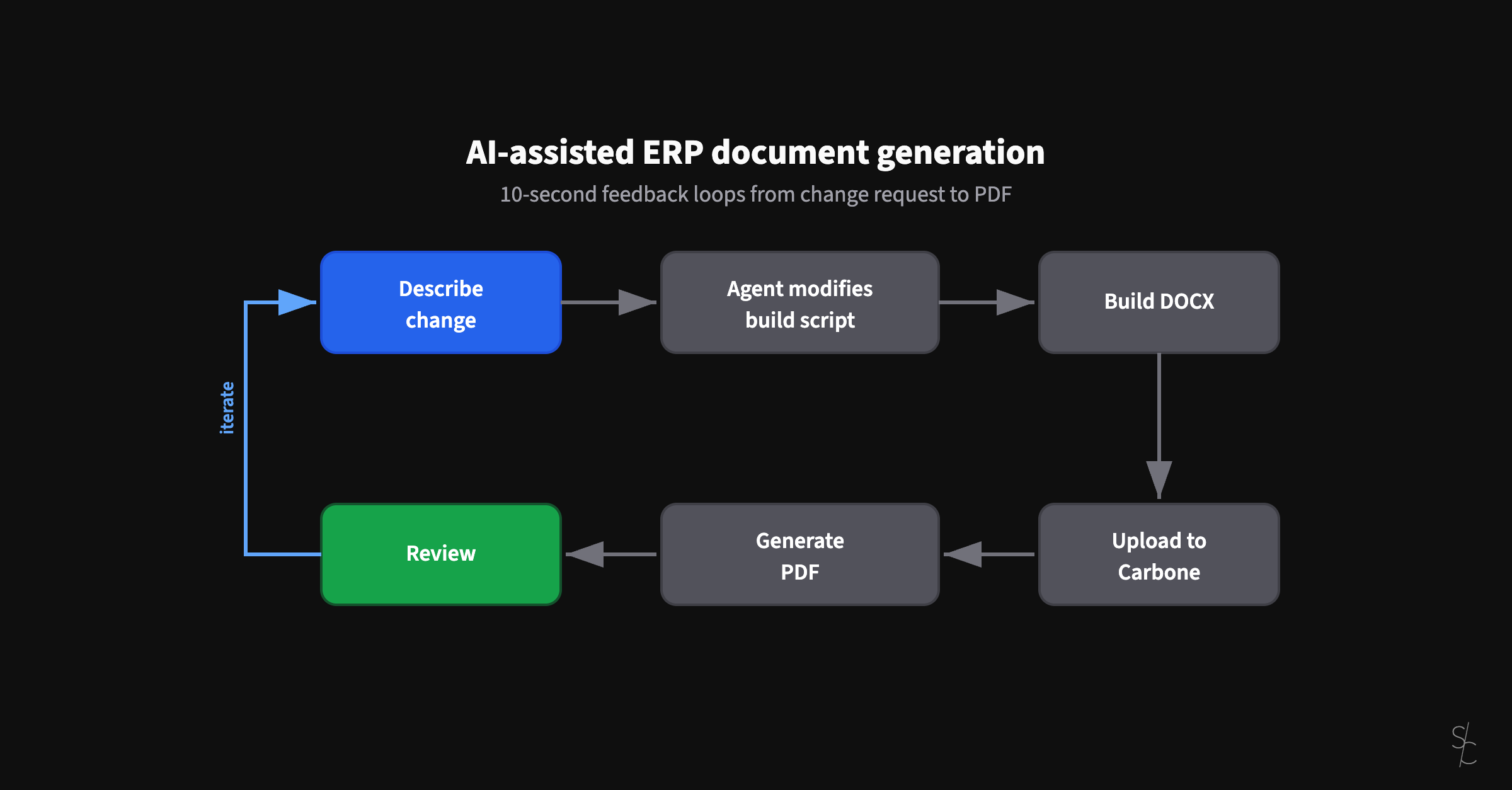
Total cycle time: under ten seconds. The traditional workflow takes five to 15 minutes per iteration. That's not a marginal improvement. It's a different feedback category.
The same loop works for every kind of document change. "Add a QR code to the picking list." "Remove the delivery date column, nobody uses it." "Show the supplier's item code only for items from this specific supplier." "This line item splits across pages, fix it." Each of these is a sentence to the agent and a ten-second verification cycle. In the traditional workflow, each one is a ticket.
The agent handles harder problems too. When row 390 split across pages, it read the docx-js documentation, identified that keepNext on paragraphs chains rows together on the same page, and added it to the right rows. Only non-terminal rows, to prevent chaining across separate line items. A page break problem that requires deep knowledge of Word's internal properties, resolved by an agent that could look up the docs and apply them in context.
What changes
The examples here are reception confirmations and picking lists, but the same architecture applies to any ERP document: invoices, purchase orders, sales orders, transport notes, delivery notes, packing slips. Every one of them has conditional logic, layout constraints, and edge cases that make traditional form designers painful. The approach is the same. Template as code, data preparation in the API, ten-second iteration with an AI agent.
The real shift is subtler. When iteration takes seconds, you stop avoiding changes. You stop batching document improvements into quarterly releases. You stop accepting "good enough" because the cost of "better" dropped by two orders of magnitude.
The template is code. The code understands itself. The feedback loop is ten seconds. Everything else follows.
More from the blog
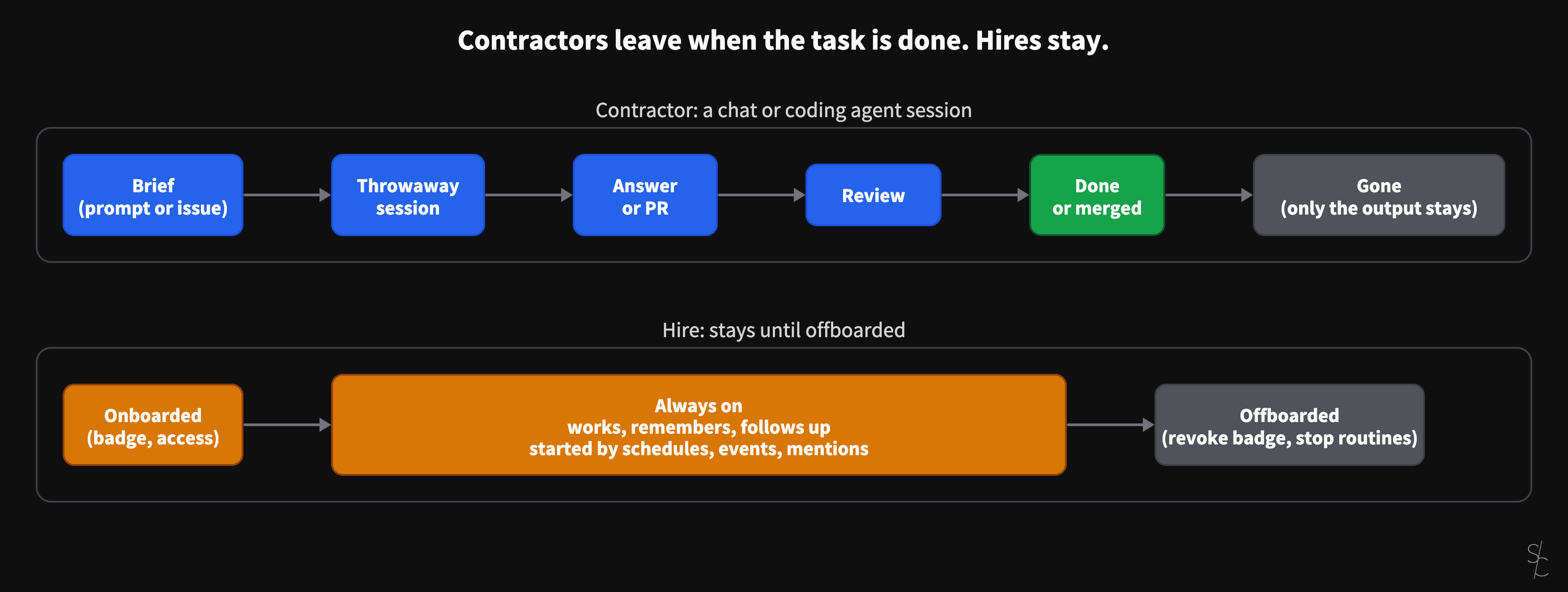
AI sessions are contractors. Always-on agents are hires.
A chat or a coding agent session ends when the task is done, when the answer is given or the PR is merged. Grok Bot and OpenAI's dots stay. That changes what you have to give them.
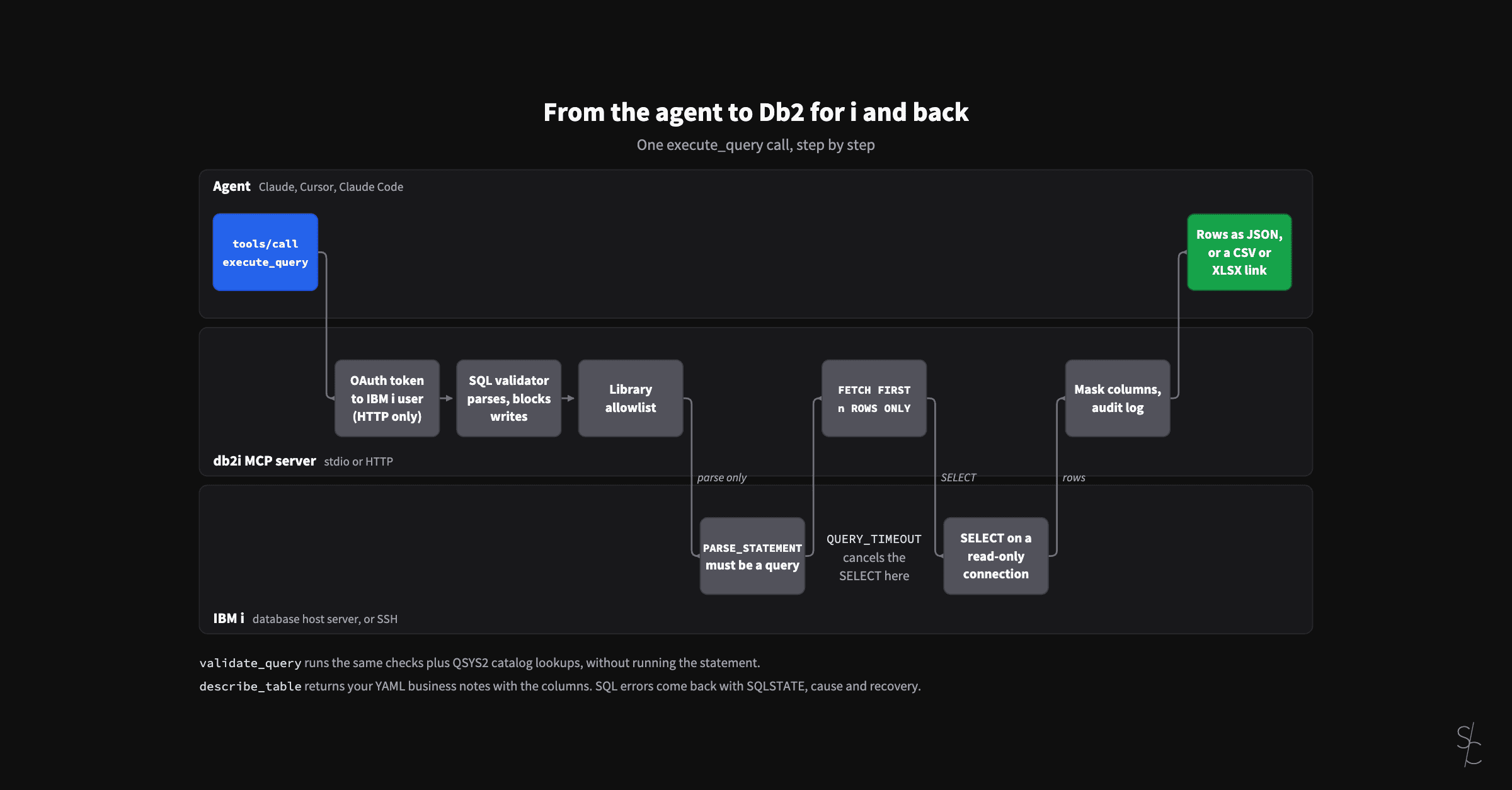
Eight months of an MCP server for Db2 for i
In January the server looked up table definitions so the AI would stop guessing. At 2.12 it checks its SQL against the IBM i, reads your business definitions, and lets colleagues sign in as themselves.
Subagents replaced my /code-review command
Rules tell agents what to do. Subagents verify they actually did it.
